What a managed service with an SLA includes: monitoring, response and reporting
Monitoring that detects failures before anyone complains, contractual response times and reports that show whether the service is delivered. And what 99.9% really means.
Monday, nine in the morning. At one branch the till cannot take payments, at another the WiFi is slow, and at head office nobody understands what is going on. Someone calls the provider, who promises to come by "as soon as possible". Hours later a device is restarted, everything works again and nobody knows why it failed or whether it will happen again.
A managed service with an SLA exists so that morning goes differently: the failure is detected before anyone complains, someone responds within a committed time and there is a record of what happened. Here we explain what it includes, what an SLA defines and how to read its numbers.
What a managed service solves
You find out when users complain
The first alert is an annoyed call from a branch, not a system watching the network.
Support "when possible"
With no committed times, your failure competes with the technician's schedule and the provider's other clients.
No record of incidents or changes
Nobody knows how many times a link failed, who changed a configuration or when.
Several sites, no common view
Each branch has its own equipment, link and history. There is no single screen that shows it all.
A provider that does not report
You pay for support, but you get no data on what was done or how your network is doing.
A contract without metrics
If nothing is measured, there is no way to know whether the service you pay for is being delivered.
From reacting to managing: the life cycle of an incident
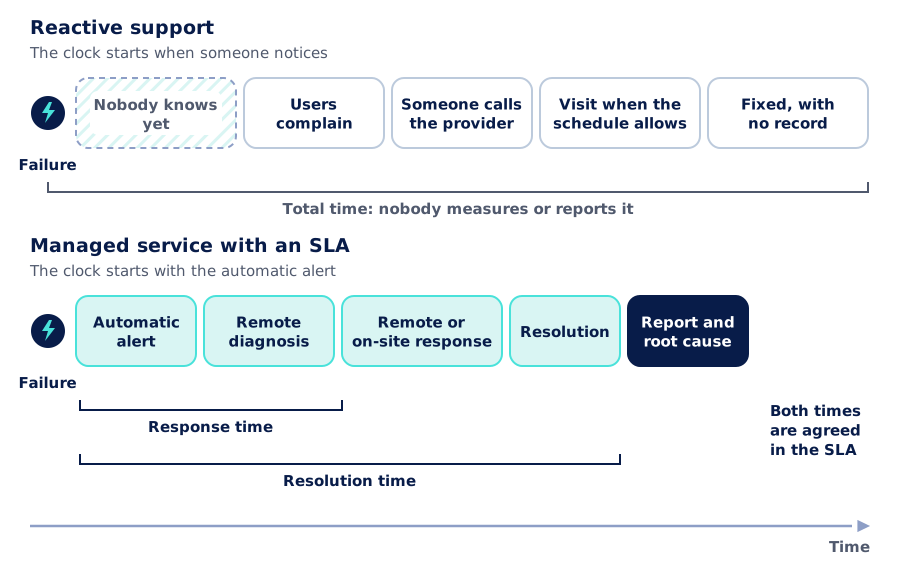
The difference between reactive support and a managed service is easiest to see over time. In the reactive model, the clock starts when someone notices. In a managed service, it starts when the system detects the failure.
- 1
Automatic detection
Our management system watches devices, links and services around the clock. When something stops responding or degrades, it raises an alert that our monitoring team (NOC) picks up.
- 2
Diagnosis
We check remotely what failed and who is affected: a device, a link or an entire site. That sets the priority.
- 3
Response
Whatever can be fixed remotely is fixed remotely. If needed, a technician goes on site with the right spare part or configuration.
- 4
Resolution
The service is back up. If the site has a backup link, it kept working while the main one was repaired.
- 5
Report
Every incident is logged: what happened, when, what was done and what caused it, so it does not happen again.
What an SLA defines
The SLA (service level agreement) is the part of the contract that turns "good support" into measurable commitments. We agree on it based on how critical your operation is. These are the concepts worth understanding:
Committed availability
The percentage of time the service must be up, and how it is measured: per site, per link or per service.
Response time
How long it takes to start working on an incident after the alert or report. It is not the same as fixing it.
Resolution time
The time allowed to restore the service, which usually varies with the priority of the incident.
Priorities
What counts as critical, such as a site with no service, and what does not, such as a single faulty network drop.
Support channels
How incidents are reported and how progress is communicated, as agreed.
Coverage hours
Whether support is 24/7 or business hours, and how scheduled maintenance is handled.
What 99.9% availability means
Availability percentages all look alike until you turn them into hours. A year has 8,760 hours: 99.9% allows about 8 hours and 46 minutes of downtime per year, or about 43 minutes in a 30-day month. Each additional nine cuts that margin by a factor of ten.
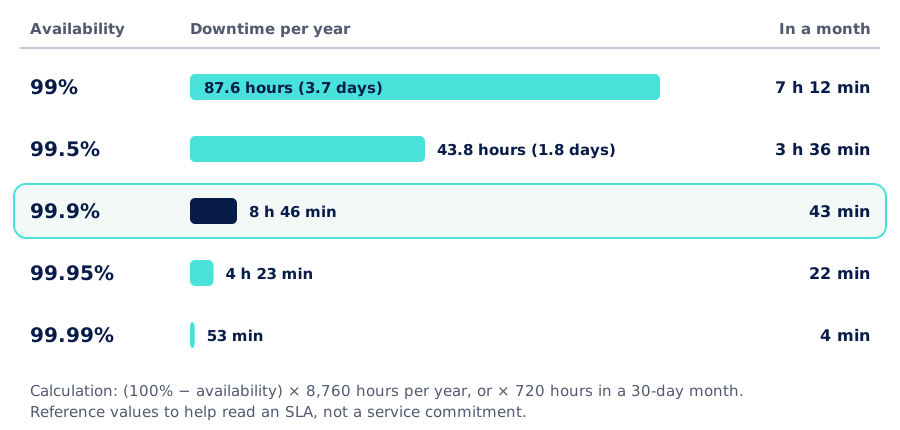
When reading an SLA, check two details: whether scheduled maintenance counts as downtime, and whether availability is measured for the whole network or for each site. The physical side matters too: a single internet link can hardly sustain high availability on its own, which is why the most demanding levels usually require backup links and redundant equipment.
You can run your own numbers, including the effect of redundancy, with the Availability & SLA calculator on AISCNET Learning.
A view for management
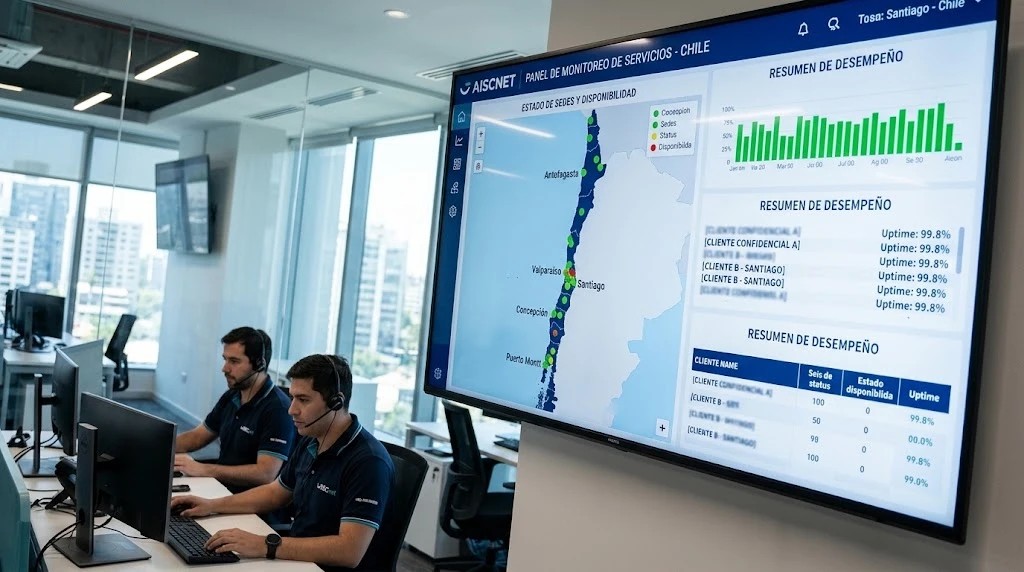
Technical monitoring produces thousands of data points. Management needs only a few: whether the network is working, what happened this month and whether the service met its commitments. That is why we deliver executive dashboards, designed to be read without being technical.
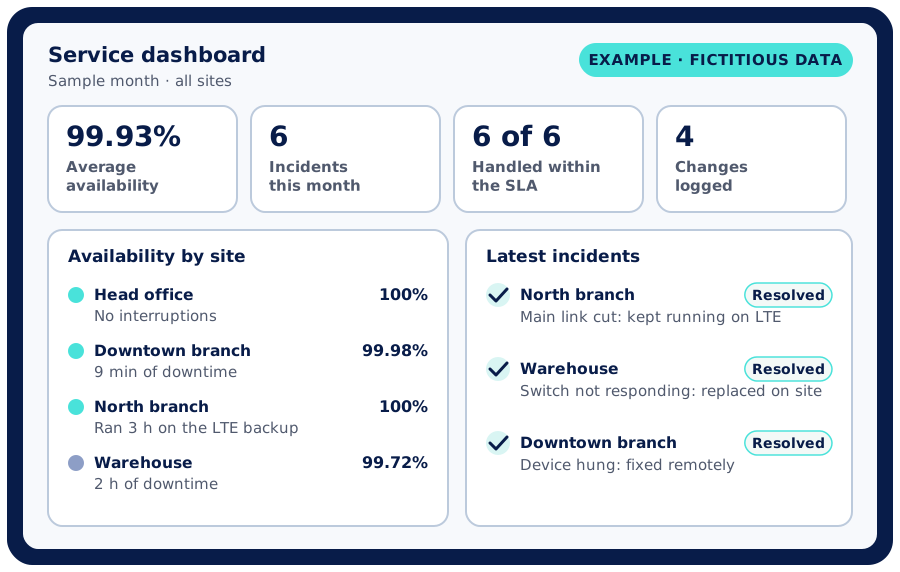
In the example, a branch lost its main link but kept working on the LTE backup: the incident happened, was logged and resolved, and that site's availability was not affected. With that information you can decide, for instance, whether it is worth adding a backup link at the warehouse.
Several sites, one operation
When your company has branches, the managed service also takes care of what connects them:
Multi-site SD-WAN
Smart links between branches: priority for critical traffic, use of more than one link and centralized management of every site.
Backup connectivity
LTE, 5G or satellite links that keep a site running if the main link goes down, or that connect remote locations.
On-site support
When a problem cannot be fixed remotely, a technician goes to the site with what is needed to get it running.
Remote when possible, on site when needed
Many incidents are diagnosed and fixed remotely. When a device has to be replaced or cabling checked, the technician arrives knowing what failed, because the diagnosis has already been done.
Reactive support or managed service
| Reactive support | Managed service with an SLA | |
|---|---|---|
| How you learn about a failure | From users | From a monitoring alert |
| When the clock starts | When someone reports it | When the failure is detected |
| Response times | Whenever the provider can | Committed in the SLA |
| Record of incidents and changes | Rarely | Every incident and every change |
| Several sites | Each one on its own | A single view and the same standard |
| Information for management | Whatever is requested | Dashboards and periodic reports |
| Backup connectivity | If someone installed it | Part of the design when the operation needs it |
General comparison; the scope and times of each service are defined in its contract.
How we get started
Assessment
Survey of network, sites and links
Remediation
Document and bring up to standard
SLA
Times that fit your operation
Monitoring
Integration into our system
Support
Response, dashboards and reviews
We can take over a network that already exists, whether we installed it or someone else did. The service starts with an assessment and a survey of that network; then we bring it up to standard and operate it from there. If you have an IT team, we work alongside it; if not, we act as your network team.
Further reading
- Buying the network or paying for it monthly: what changes with a managed service and when buying makes more sense.
- Availability & SLA calculator (AISCNET Learning): availability from MTBF and MTTR, with redundancy, and downtime per year.
- DNS & Network Troubleshooting (AISCNET Learning): what to check first when "the internet is down".
- Connected cameras and access control: physical security and the network working together, without exposing your systems.
- WiFi for large hotels: a case where, if we operate the network (network as a service or managed services), it is integrated into our management system.
Tell us what you need through our contact form or learn more about our managed services. The initial assessment is free.
- Servicios gestionados
- SLA
- Monitoreo de red
- NOC
- Disponibilidad
- SD-WAN
- Respaldo LTE/5G
- Soporte en terreno