Buying the network or paying for it monthly: what changes with a managed service
CapEx or OpEx: what changes when the network is paid for as a service, who takes care of equipment, licenses and failures, and when buying makes more sense.

Every few years the same conversation reaches management: the switches no longer get updates, the firewall needs its license renewed and someone has to justify a large investment in something that, from the outside, "was already working". It gets approved, bought and installed… and for a few years nobody looks at the network again until something fails.
There is another way to have a network: paying for it as a monthly service, which we call Network as a Service (NaaS). A provider designs, implements, operates and refreshes it, with service levels written into a contract. It is not the best option for every company. Here we explain what changes, what does not and how to tell which model suits you.
What usually happens with a purchased network
Buying is not a mistake. The problem starts when the purchase is the only decision and nobody is left in charge of what comes next. These are the situations we see most often:
A large investment every few years
The network is replaced all at once and competes for budget with projects that look more urgent.
Obsolete equipment waiting for budget
The manufacturer stopped releasing updates, but the equipment stays in service because the refresh was not approved.
Licenses that expire without warning
Firewall, cloud management and manufacturer support expire on different dates. Someone finds out when a feature stops working.
The IT person leaves
Passwords, configuration and the reasoning behind every decision leave with them. The network needs a new survey from scratch.
Unpredictable maintenance
An out-of-warranty failure, an urgent visit or a spare part shows up in the worst month of the year.
Nobody watches the network until it fails
Without monitoring, problems surface when users complain.
CapEx and OpEx, simply put
Finance distinguishes two kinds of spending. CapEx (capital expenditure) is investment in assets: you buy the equipment, it becomes company property and it depreciates over its useful life. OpEx (operating expenditure) is what you pay to keep running: rent, utilities or, in this case, a monthly fee for a network someone else operates.
The difference is not just an accounting one. It changes the shape of spending over time and, above all, who carries the risk: equipment that fails, licenses that expire and technology that ages.
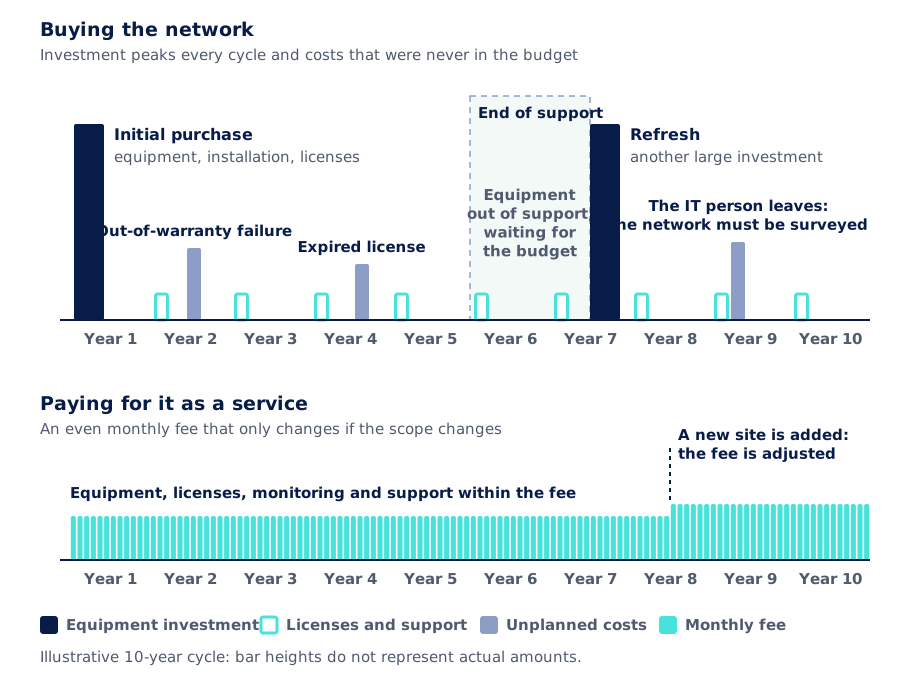
Look at the middle zone. When the equipment reaches end of support and the refresh has not been approved, the network keeps working, but without security updates. It is the riskiest period and it often goes unnoticed, because from the outside everything looks normal.
One important caveat: the accounting and tax treatment of each model depends on your company and on how the contract is written. Review it with your accounting team before deciding.
An example to put it in numbers
Picture a company with a head office and two branches: switches, a firewall and WiFi access points. Assume, purely as an example, that the manufacturer supports the equipment for five years and that firewall and management licenses are paid once a year. Over a 10-year horizon, the payment calendar looks like this:
| Buying the network | Managed service | |
|---|---|---|
| Large investments | 2: the initial purchase and the refresh | None in equipment |
| License and support renewals | One a year, on dates someone has to track | Within the fee |
| Unplanned costs | No known date or amount | Covered according to the contract |
| Payments per year | Uneven: a lot some years, little in others | 12 equal fees |
| Budget approvals | A large one every cycle | When signing, then only if the scope changes |
Illustrative example with no amounts. The number of payments depends on each company's equipment, manufacturers and contracts.
A useful way to read the example: if the equipment lasts five years, every year you should set aside a fifth of the cost of the next refresh. If that reserve does not exist, the refresh arrives as a cash problem, and that is when equipment is left waiting.
What the example does not say is which model costs less. A monthly fee includes things the price of the equipment does not: monitoring, support, updates and the time of people who know your network. To compare seriously, add up everything it costs today to operate the network, not just what it costs to buy it.
Who takes care of what
The key question is not "who owns the equipment?" but "who responds when something happens?".
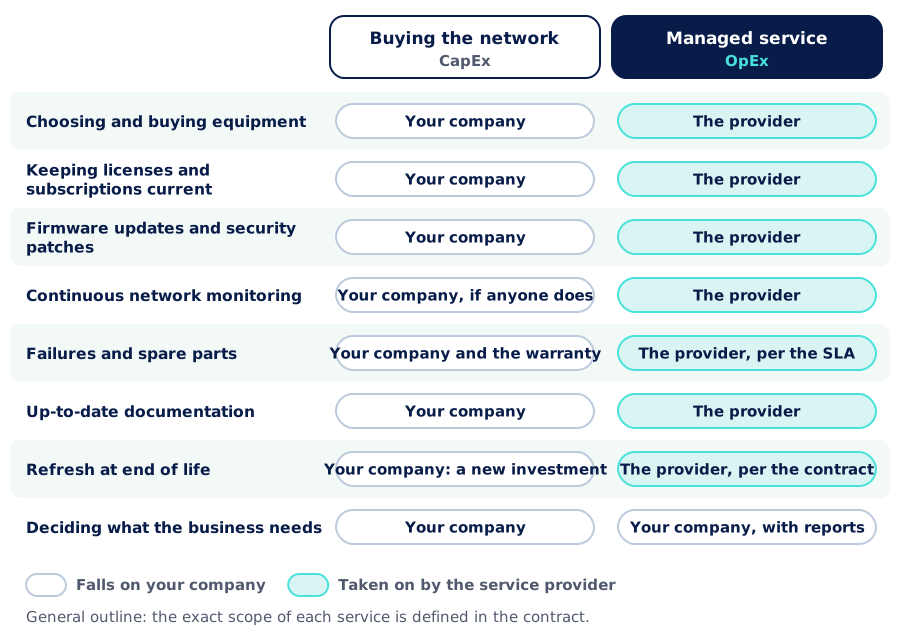
One row does not change: deciding what the business needs is still up to you. What changes is that you make those decisions with information, without operating the network or depending on a single person who knows it.
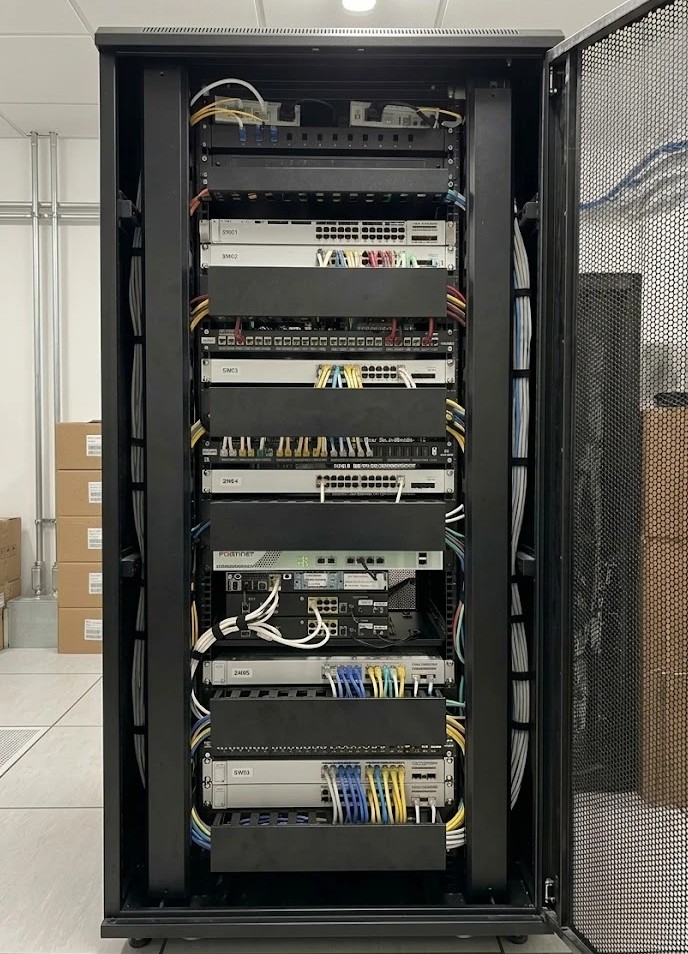
Buying or contracting: an honest comparison
| Buying (CapEx) | Managed service (OpEx) | |
|---|---|---|
| Upfront investment | High: equipment, installation and licenses | No upfront investment in equipment |
| Shape of spending | Peaks every cycle, plus surprises | Even monthly fee |
| Equipment ownership | Your company | Defined in the contract |
| Risk of failures and obsolescence | You carry it | The provider carries it, per the contract |
| Technology refresh | Depends on budget approval | Planned within the service |
| Knowledge of the network | With the people on your team | Documented and held by a team |
| Commitment | None after the purchase | A contract for a defined term |
| Total cost over the cycle | Can be lower if you have in-house staff and the network changes little | Includes operation: compare it with everything it costs you today to run the network |
General comparison between two models; it does not describe a specific offer.
Buying usually makes sense if…
You have an IT team with time and know-how
Someone monitors, updates and documents the network as part of their job, not as a pending task.
You need the equipment to be your own assets
Because of an internal policy, the requirements of a tender or the way the project is financed.
The network is small and changes little
A single office, few devices and no plans to grow in the coming years.
You have the capital and the refresh plan
The replacement budget exists and is respected every year.
The service usually makes sense if…
The network depends on one person
Or you have no network team at all. The service gives you a team that knows your network and keeps it documented.
You have several sites
Every branch adds equipment, links and licenses. A service runs them all to the same standard, with a single view.
You need a cost you can budget for
A known fee is easier to plan than an investment every cycle and costs with no date.
Your operation cannot stop
If a network outage stops sales, production or customer service, someone should be watching it and responding within committed times.
How we move your network to a service model
- 1
Assessment and survey
We review the network you have: equipment, licenses, end-of-support dates, links and documentation.
- 2
Design and service scope
We define what stays, what gets replaced and what the service includes. We are vendor agnostic: we choose the equipment for the project and integrate it with what is already installed.
- 3
Service level agreement
We put in writing the committed availability, response times and support channels, based on how critical your operation is.
- 4
Phased implementation
We bring the network up to standard or replace equipment site by site or area by area, coordinated with your operation so it does not stop.
- 5
Monitored operation
When we operate your network as a service, we integrate it into our management system, from where we monitor it.
- 6
Support and a planned refresh
We handle incidents according to the SLA, deliver dashboards with the status of the network and service compliance, and plan the refresh before the equipment runs out of support.
If your network needs a redesign before moving to a service, such as segmenting networks, improving WiFi or connecting sites, we handle it through our connectivity and networks service.
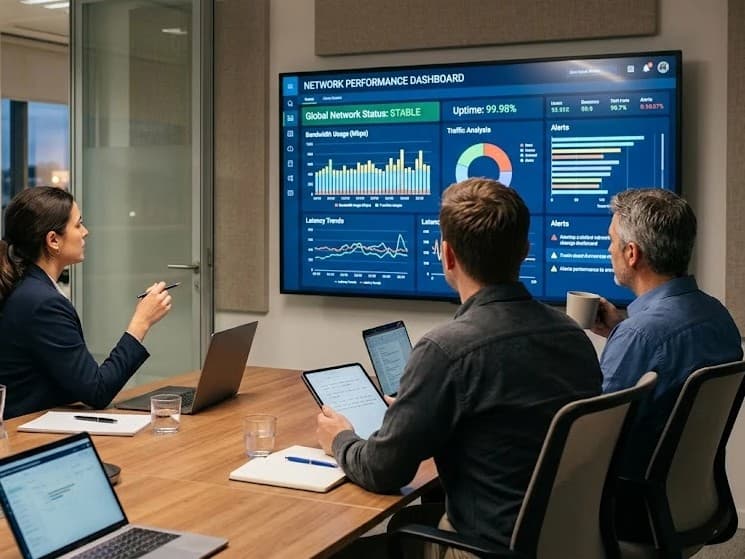
Reviews based on data, not assumptions
In service reviews we go over each site's availability, the incidents of the period and what is worth changing, together with you. If the network needs to grow, we discuss it there, with information, before it turns into an emergency.
Further reading
- What a managed service with an SLA includes: monitoring, response times, reporting and what 99.9% availability means.
- Availability & SLA calculator (AISCNET Learning): work out the availability of a system and how much downtime per year each level allows.
- A well-segmented network: operations, guests, cameras and IoT, each on its own network.
- From a tangled rack to a telecom room that makes sense: the order and documentation that make it possible to operate a network.
Tell us what you need through our contact form or learn more about our managed services. The initial assessment is free.
- Servicios gestionados
- Red como servicio
- NaaS
- CapEx
- OpEx
- Renovación tecnológica
- SLA